> For the complete documentation index, see [llms.txt](https://docs.decentraland.org/llms.txt). Markdown versions of documentation pages are available by appending `.md` to page URLs; this page is available as [Markdown](https://docs.decentraland.org/creator/content-creator-zh/chang-jing-bian-ji-qi/gou-jian/spawn-areas.md).
# 生成区域
使用生成区域以可视化方式设置生成位置和生成摄像机位置。
创作者可以设置 **出生位置** 和 **出生摄像机目标** 在 Creator Hub 中,通过编辑一个 **出生区域** 实体。
这为创作者提供了一种可视化方式来设置出生区域以及头像出生时面向的方向,就像在场景中对其他对象所做的那样。
出生区域定义了玩家直接进入你的场景时出现的位置,无论是通过输入坐标还是传送。你的场景中可能有一些物体会阻挡玩家移动,如果他们刚好出生在这些物体上方,比如树木或楼梯,或者你的场景可能有较高的地形。如果玩家出生在无法移动的物体上方,体验会很糟糕。这就是为什么你可以选择在特定位置设置一个或多个出生点。
{% hint style="warning" %}
**📔 注意**:所有出生点都必须位于构成该场景的地块内。你不能将玩家出生在这些地块范围之外。
{% endhint %}
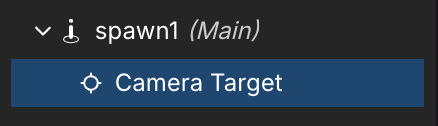
 出生区域由两个协同工作的不同实体组成:
* **出生** 实体:可以在 **玩家** 实体中找到。定义玩家实际的出生点。
出生区域由两个协同工作的不同实体组成:
* **出生** 实体:可以在 **玩家** 实体中找到。定义玩家实际的出生点。
 * **摄像机目标** 实体:可以在 **出生区域** 实体。将其移动到玩家出生时所需面向的方向。
 ## 更改出生区域
**出生区域** 及其 **摄像机目标** 可以像场景中的任何其他对象一样直接从场景编辑器中移动,或者手动修改其值(就像其他实体中的变换一样)。
### 参数
选中出生区域后,创作者可以在组件部分查看并设置以下值:
## 更改出生区域
**出生区域** 及其 **摄像机目标** 可以像场景中的任何其他对象一样直接从场景编辑器中移动,或者手动修改其值(就像其他实体中的变换一样)。
### 参数
选中出生区域后,创作者可以在组件部分查看并设置以下值:
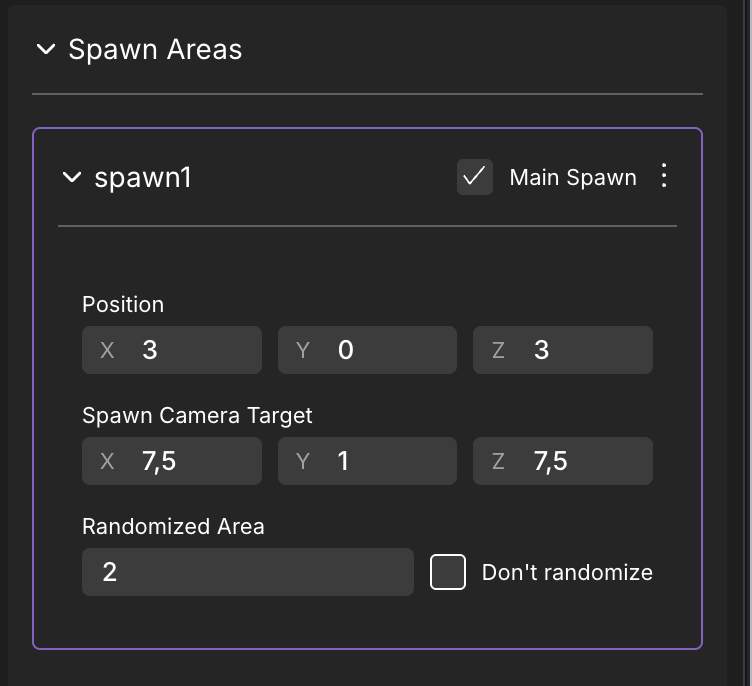 * **位置**:头像的出生位置。这些是场景内相对于场景原点的坐标,类似于你在变换组件中会使用的坐标。
* **出生摄像机目标**:摄像机(以及头像)在进入场景后将面向的方向。使用此项可更好地控制玩家进入你的场景时的第一印象。
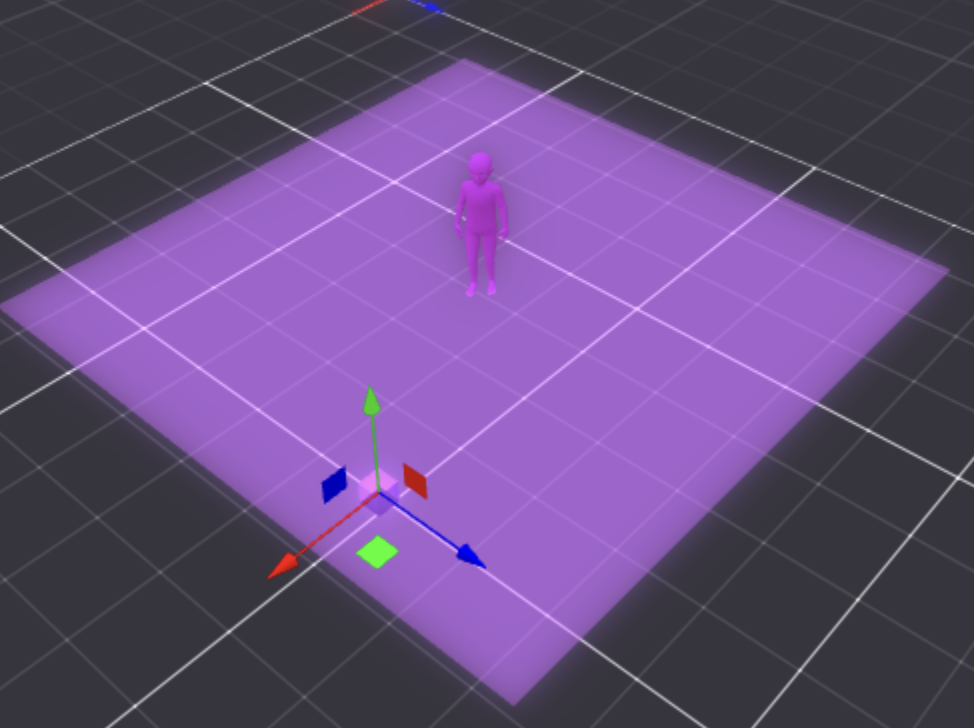
* **随机区域**:通过以米为单位为出生区域添加随机性,并可使用 **不随机化** 切换开关进行启用和禁用。启用后,场景编辑器中会渲染一个区域,显示玩家可以随机出生的范围。随机偏移会同时作用于 X 轴和 Z 轴,并可防止所有玩家在出生时彼此重叠,这在拥挤的场景中看起来尤其糟糕。
* **位置**:头像的出生位置。这些是场景内相对于场景原点的坐标,类似于你在变换组件中会使用的坐标。
* **出生摄像机目标**:摄像机(以及头像)在进入场景后将面向的方向。使用此项可更好地控制玩家进入你的场景时的第一印象。
* **随机区域**:通过以米为单位为出生区域添加随机性,并可使用 **不随机化** 切换开关进行启用和禁用。启用后,场景编辑器中会渲染一个区域,显示玩家可以随机出生的范围。随机偏移会同时作用于 X 轴和 Z 轴,并可防止所有玩家在出生时彼此重叠,这在拥挤的场景中看起来尤其糟糕。
 ## 多个出生区域
 创作者可以定义多个 **出生区域** 。要创建新的出生区域,请按以下步骤操作:
1. 选择任意出生区域, **spawn1** 为默认项。
2. 所有出生区域都会显示在右侧面板中。你可以通过点击 **+ 添加新的出生区域**
创作者可以定义多个 **出生区域** 。要创建新的出生区域,请按以下步骤操作:
1. 选择任意出生区域, **spawn1** 为默认项。
2. 所有出生区域都会显示在右侧面板中。你可以通过点击 **+ 添加新的出生区域**
 .
.
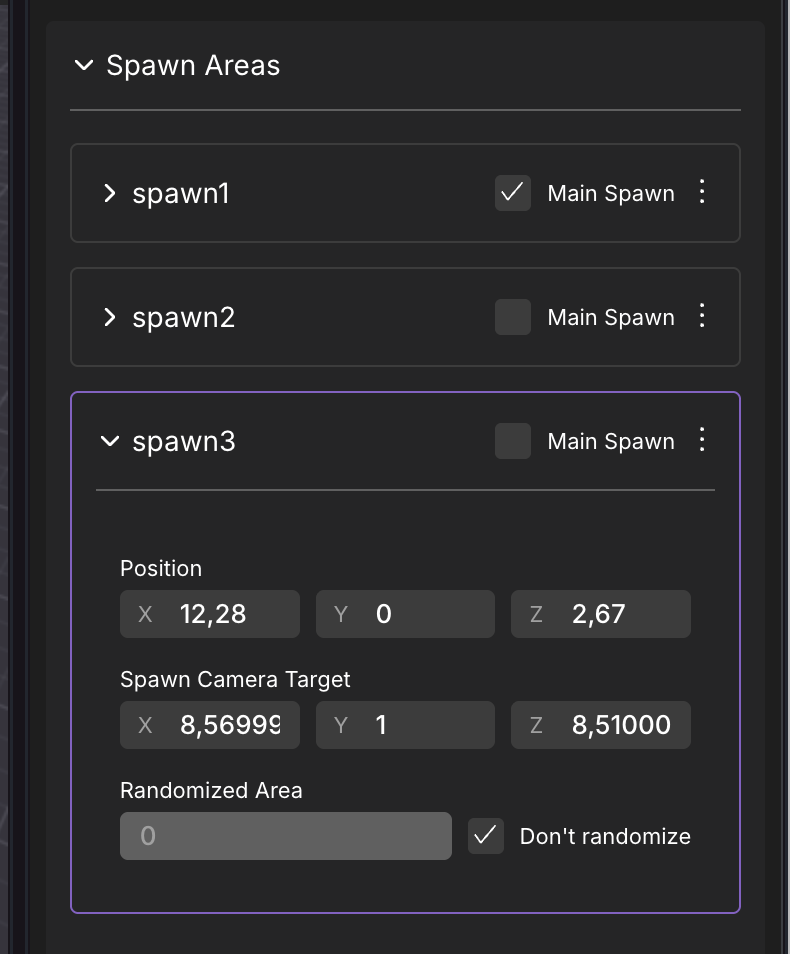 3. 启用 **主出生点**
 中所需出生区域的。如果有许多出生区域被切换为 **主出生点**,玩家将随机出现在其中一个。
4. 预览场景。
---
# Agent Instructions
This documentation is published with GitBook. GitBook is the documentation platform designed so that both humans and AI agents can read, navigate, and reason over technical content effectively. Learn more at gitbook.com.
## Querying This Documentation
If you need additional information that is not directly available in this page, you can query the documentation by asking a question.
Perform an HTTP GET request on the following URL with the `ask` and `goal` query parameters:
```
GET https://docs.decentraland.org/creator/content-creator-zh/chang-jing-bian-ji-qi/gou-jian/spawn-areas.md?ask=&goal=
```
`ask` is the immediate question: it should be specific, self-contained, and written in natural language.
`goal` is what the user is ultimately trying to achieve, the reason they need the answer. Sharing it helps GitBook give you a better, more relevant answer. A goal is most helpful when it describes the outcome the user wants rather than restating the question. For example, with `ask=how do I create an API token`, a goal like `automate deployments from our CI pipeline` lets GitBook tailor the answer to that use case.
The response will contain a direct answer to the question and relevant excerpts and sources from the documentation.
Use this mechanism when the answer is not explicitly present in the current page, you need clarification or additional context, or you want to retrieve related documentation sections.
中所需出生区域的。如果有许多出生区域被切换为 **主出生点**,玩家将随机出现在其中一个。
4. 预览场景。
---
# Agent Instructions
This documentation is published with GitBook. GitBook is the documentation platform designed so that both humans and AI agents can read, navigate, and reason over technical content effectively. Learn more at gitbook.com.
## Querying This Documentation
If you need additional information that is not directly available in this page, you can query the documentation by asking a question.
Perform an HTTP GET request on the following URL with the `ask` and `goal` query parameters:
```
GET https://docs.decentraland.org/creator/content-creator-zh/chang-jing-bian-ji-qi/gou-jian/spawn-areas.md?ask=&goal=
```
`ask` is the immediate question: it should be specific, self-contained, and written in natural language.
`goal` is what the user is ultimately trying to achieve, the reason they need the answer. Sharing it helps GitBook give you a better, more relevant answer. A goal is most helpful when it describes the outcome the user wants rather than restating the question. For example, with `ask=how do I create an API token`, a goal like `automate deployments from our CI pipeline` lets GitBook tailor the answer to that use case.
The response will contain a direct answer to the question and relevant excerpts and sources from the documentation.
Use this mechanism when the answer is not explicitly present in the current page, you need clarification or additional context, or you want to retrieve related documentation sections.