> For the complete documentation index, see [llms.txt](https://docs.decentraland.org/llms.txt). Markdown versions of documentation pages are available by appending `.md` to page URLs; this page is available as [Markdown](https://docs.decentraland.org/creator/content-creator-zh/chang-jing-sdk7/jiao-hu-xing/touch-screen-controls.md).

# 屏幕控制

为你的场景配置原生的屏幕触控控制。

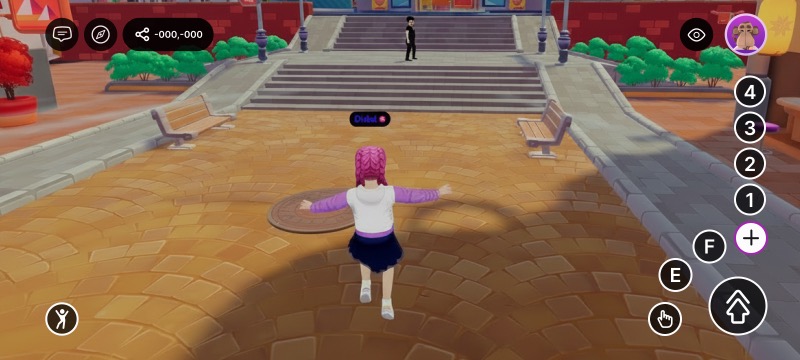
在移动客户端上，玩家通过一组原生屏幕控制与你的场景交互——一个虚拟摇杆、一个准星和一组游戏手柄按钮。该 `TouchScreenControls` 组件让你的场景能够重塑该 HUD：减少杂乱、隐藏摇杆或准星、更改中央大按钮的作用、将某个按钮的图标替换为你自己的图标，或者完全隐藏按钮并用你自己的 UI 取而代之。

<figure><img src="https://2460066822-files.gitbook.io/~/files/v0/b/gitbook-x-prod.appspot.com/o/spaces%2FoPnXBby9S6MrsW83Y9qZ%2Fuploads%2Fgit-blob-0a69ce0ba0199fe829376ff409c7ffa02c679b0a%2Ftouch-controls-default.jpg?alt=media" alt="The default mobile HUD: virtual joystick on the left, gamepad buttons on the right"><figcaption><p>自定义之前的默认屏幕控制项</p></figcaption></figure>

{% hint style="info" %}
该组件会在玩家进入你的场景时自动应用，并在他们离开时立即恢复为默认值（不隐藏任何内容，中央按钮为跳跃）——因此不使用它的场景不会受到影响。它只影响带有原生屏幕控制的平台：在桌面端无操作，在 VR 中也没有影响。
{% endhint %}

## 按钮布局的工作方式

游戏手柄按钮构成一个单独的 **优先级栈**。顺序固定：

1. `IA_JUMP`
2. `IA_POINTER`
3. `IA_PRIMARY` (E)
4. `IA_SECONDARY` (F)
5. `IA_ACTION_3` (1)
6. `IA_ACTION_4` (2)
7. `IA_ACTION_5` (3)
8. `IA_ACTION_6` (4)

屏幕上的位置也同样固定。按钮会 **visible** 从堆栈顶部向下填充这些位置——所以你改变的是 *哪些* 按钮可见，以及 *哪个按钮居首*，而不是它们的顺序。

| 当你……时                                   | 控件……                                                 |
| --------------------------------------- | ---------------------------------------------------- |
| **隐藏一个按钮** （任何按钮，包括跳跃按钮）                | 每个更低优先级的按钮都会上移来填补空缺。隐藏跳跃按钮，然后 `IA_POINTER` 就会占据中央位置。 |
| **保持堆栈不变**                              | 第一个按钮（`IA_JUMP`）是中央大按钮；接下来的按钮填充周围槽位。                 |
| **设置主按钮** 中调用你的 UI 渲染方法，使用 `mainAction` | 该动作会跃升到最前面并成为中央按钮；其他按钮保持其正常顺序。                       |
| **设置一个同时也被隐藏的主按钮**                      | 隐藏优先——按钮保持隐藏。                                        |
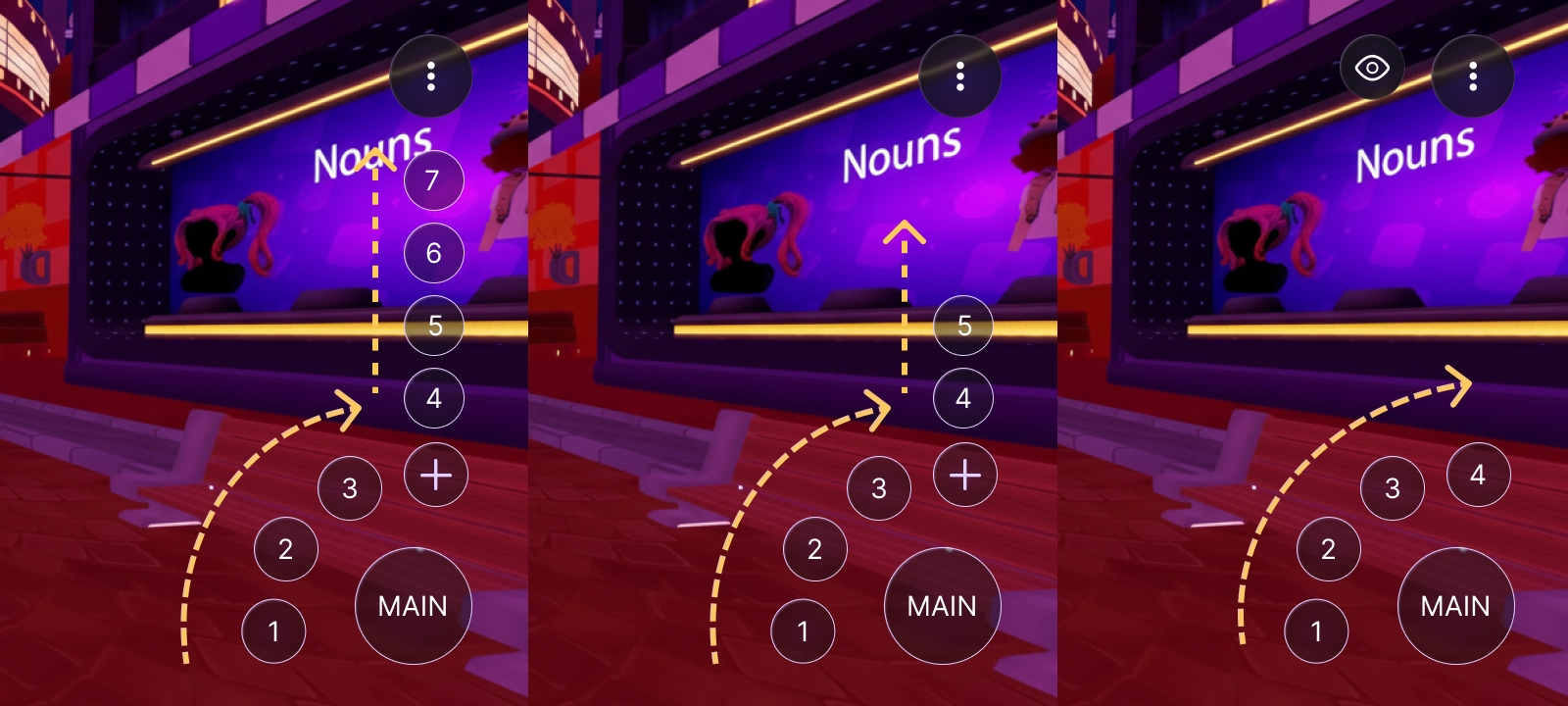
| **保留 5 个或更少按钮可见**                       | 它们都会直接显示（中央按钮加上周围最多四个按钮）；不会出现“+”菜单。                  |
| **保留超过 5 个按钮可见**                        | “+”占据最后一个位置，因此有四个会直接显示（中央按钮加上三个），其余按钮位于“+”溢出切换之后。    |

<figure><img src="https://2460066822-files.gitbook.io/~/files/v0/b/gitbook-x-prod.appspot.com/o/spaces%2FoPnXBby9S6MrsW83Y9qZ%2Fuploads%2Fgit-blob-67ed40e222e68d9b13997d0b2fec7e399fc57de0%2Fcontrol-ordering.jpg?alt=media" alt="Three HUDs showing the gamepad reflowing as the number of visible buttons changes"><figcaption><p>按钮如何随可见数量重新布局。 <strong>左侧（7 个按钮）：</strong> 主按钮、1–3 形成的弧形，以及用“+”承载溢出项（4–7）的向上排列列。 <strong>中间（5 个按钮）：</strong> 同样的弧形，只是“+”后面的溢出列更短（4–5）。 <strong>右侧（4 个按钮）：</strong> 四个都会直接显示，“+”消失。</p></figcaption></figure>

{% hint style="info" %}
这也是你显示 `1`/`2`/`3`/`4` 原本会藏在“+”后面的按钮的方式：隐藏足够多的更高优先级按钮，把可见数量降到五个或更少，它们就会直接显示。
{% endhint %}

## 常见任务

`TouchScreenControls` 提供了一组便捷辅助函数。每个函数都会把该组件写入场景的 `RootEntity` （客户端从这里读取），并与当前值合并，所以你可以从任何地方调用它们。

**更改主按钮** ——让中央大按钮触发不同的动作：

```ts
import { TouchScreenControls, InputAction } from '@dcl/sdk/ecs'

export function main() {
	TouchScreenControls.setMainAction(InputAction.IA_PRIMARY)
}
```

**隐藏摇杆或准星** ——移除移动摇杆和/或瞄准准星，并使用它们的 `显示` 对应方法将其恢复：

```ts
TouchScreenControls.hideJoystick()
TouchScreenControls.hideCrosshair()

// 要把它们带回来：
TouchScreenControls.showJoystick()
TouchScreenControls.showCrosshair()
```

**隐藏特定按钮** ——传入你想移除的动作（其余会向上级联）：

```ts
TouchScreenControls.hide([InputAction.IA_SECONDARY, InputAction.IA_JUMP])
```

**隐藏或显示所有按钮** ——清空 HUD，或者重置它：

```ts
TouchScreenControls.hideAll()
TouchScreenControls.showAll()
```

`showAll()` 只会影响游戏手柄按钮——不会恢复被隐藏的摇杆或准星。对那些按钮请使用 `showJoystick()` / `showCrosshair()` 。

**替换按钮图标** ——若想获得完全控制（自定义图标、一次进行多项更改），请将原始组件写入 `engine.RootEntity`:

```ts
import { engine, TouchScreenControls, InputAction } from '@dcl/sdk/ecs'

export function main() {
	TouchScreenControls.createOrReplace(engine.RootEntity, {
		hideCrosshair: true,
		mainAction: InputAction.IA_PRIMARY,
		touchInputs: [
			{
				inputAction: InputAction.IA_PRIMARY,
				icon: { tex: { $case: 'texture', texture: { src: 'images/grab.png' } } },
			},
		],
	})
}
```

辅助函数一览：

| 辅助函数                    | 作用                                       |
| ----------------------- | ---------------------------------------- |
| `setMainAction(action)` | 设置中央大按钮触发哪个动作。                           |
| `hideJoystick()`        | 隐藏原生虚拟摇杆。                                |
| `showJoystick()`        | 再次显示原生虚拟摇杆。                              |
| `hideCrosshair()`       | 隐藏屏幕上的准星/瞄准标记。                           |
| `showCrosshair()`       | 再次显示屏幕上的准星/瞄准标记。                         |
| `hide(actions)`         | 隐藏指定的游戏手柄按钮（并入当前配置）。                     |
| `hideAll()`             | 隐藏所有游戏手柄按钮。                              |
| `showAll()`             | 显示所有游戏手柄按钮（清空按钮隐藏列表）。这不会 **不是** 影响摇杆/准星。 |

## 属性

在使用 `createOrReplace`:

| 属性              | 类型                                                                                                                        | 描述                                                                                                                             |
| --------------- | ------------------------------------------------------------------------------------------------------------------------- | ------------------------------------------------------------------------------------------------------------------------------ |
| `hideJoystick`  | *布尔值*                                                                                                                     | 隐藏原生虚拟移动摇杆。                                                                                                                    |
| `hideCrosshair` | *布尔值*                                                                                                                     | 隐藏屏幕上的准星/瞄准标记。                                                                                                                 |
| `mainAction`    | [*InputAction*](/creator/content-creator-zh/chang-jing-sdk7/jiao-hu-xing/an-niu-shi-jian/click-events.md#pointer-buttons) | 将此动作移到栈顶，使其成为中央大按钮；其他按钮保持原有顺序。只有游戏手柄动作有效（见下文）。未设置时，第一个可见按钮（`IA_JUMP` （默认情况下）位于最前。参见 [按钮布局的工作方式](#how-the-button-layout-works). |
| `touchInputs`   | *数组*                                                                                                                      | 每个按钮的覆盖项。未列出的按钮会保留其默认值（显示，并使用其默认图标）。                                                                                           |

每个 `touchInputs` 条目包含：

| 字段            | 类型                                                                                                                        | 描述                                                                                                                                                                                                        |
| ------------- | ------------------------------------------------------------------------------------------------------------------------- | --------------------------------------------------------------------------------------------------------------------------------------------------------------------------------------------------------- |
| `inputAction` | [*InputAction*](/creator/content-creator-zh/chang-jing-sdk7/jiao-hu-xing/an-niu-shi-jian/click-events.md#pointer-buttons) | 该条目配置的是哪个屏幕按钮。                                                                                                                                                                                            |
| `hide`        | *布尔值*                                                                                                                     | 隐藏此按钮。默认值为 `false` （显示）。任何按钮都可以隐藏， **包括 `IA_JUMP`** ——其余按钮会级联上移以填补其位置。                                                                                                                                    |
| `图标`          | [*TextureUnion*](/creator/content-creator-zh/chang-jing-sdk7/2d-ui/ui_background.md#background) （可选）                      | 使用场景中的图片覆盖按钮图标。请使用 `纹理` 带内容映射的变体 `src` （场景中包含的一张图像）—— `{ tex: { $case: 'texture', texture: { src: 'images/grab.png' } } }`。仅支持场景内容路径（不支持外部 URL、头像或视频纹理）。对于跳跃按钮，这会替换其所有动态状态（跳跃/二段跳/滑翔）。如果路径无法解析，则使用内置图标字形。 |

## 哪些动作映射到哪些按钮

该 [`InputAction`](/creator/content-creator-zh/chang-jing-sdk7/jiao-hu-xing/an-niu-shi-jian/click-events.md#pointer-buttons) 这里的值与在各处使用的值相同 [移动端输入](/creator/content-creator-zh/wei-yi-dong-duan-gou-jian/kai-fa/input-on-mobile.md) 和 [点击事件](/creator/content-creator-zh/chang-jing-sdk7/jiao-hu-xing/an-niu-shi-jian/click-events.md)。以下是映射到屏幕按钮的动作：

| InputAction                                                   | 屏幕按钮             |
| ------------------------------------------------------------- | ---------------- |
| `IA_JUMP`                                                     | 中央大按钮（默认）        |
| `IA_POINTER`                                                  | 交互按钮             |
| `IA_PRIMARY`                                                  | E 按钮             |
| `IA_SECONDARY`                                                | F 按钮             |
| `IA_ACTION_3` / `IA_ACTION_4` / `IA_ACTION_5` / `IA_ACTION_6` | 1 / 2 / 3 / 4 按钮 |

{% hint style="warning" %}
`IA_ANY` 和 `IA_MODIFIER` 是元值——它们不会映射到按钮，也不能在这里使用。
{% endhint %}

## 示例

要隐藏摇杆、收起编号按钮，并给中央跳跃按钮换上你场景中提供的自定义图标：

```ts
import { engine, TouchScreenControls, InputAction } from '@dcl/sdk/ecs'

export function main() {
	TouchScreenControls.createOrReplace(engine.RootEntity, {
		hideJoystick: true,
		touchInputs: [
			{ inputAction: InputAction.IA_ACTION_3, hide: true },
			{ inputAction: InputAction.IA_ACTION_4, hide: true },
			{ inputAction: InputAction.IA_ACTION_5, hide: true },
			{ inputAction: InputAction.IA_ACTION_6, hide: true },
			{
				inputAction: InputAction.IA_JUMP,
				icon: { tex: { $case: 'texture', texture: { src: 'images/banana.png' } } },
			},
		],
	})
}
```

<figure><img src="https://2460066822-files.gitbook.io/~/files/v0/b/gitbook-x-prod.appspot.com/o/spaces%2FoPnXBby9S6MrsW83Y9qZ%2Fuploads%2Fgit-blob-0eef110595612782808b16d7733171deeb560f16%2Fcustom-main-action.jpg?alt=media" alt="A mobile HUD with the joystick hidden and the central jump button showing a custom banana icon"><figcaption><p>结果：摇杆消失，编号按钮隐藏（因此“+”也消失），跳跃按钮更换了图标</p></figcaption></figure>

要完全替换原生控制，请在这里隐藏它们，并使用 [UI 输入绑定](/creator/content-creator-zh/chang-jing-sdk7/2d-ui/ui_input_binding.md).

## 相关

* [UI 输入绑定](/creator/content-creator-zh/chang-jing-sdk7/2d-ui/ui_input_binding.md)
* [移动端输入](/creator/content-creator-zh/wei-yi-dong-duan-gou-jian/kai-fa/input-on-mobile.md)
* [点击事件](/creator/content-creator-zh/chang-jing-sdk7/jiao-hu-xing/an-niu-shi-jian/click-events.md)
* [从代码中检测平台](/creator/content-creator-zh/wei-yi-dong-duan-gou-jian/kai-fa/detect-platform.md)


---

# Agent Instructions
This documentation is published with GitBook. GitBook is the documentation platform designed so that both humans and AI agents can read, navigate, and reason over technical content effectively. Learn more at gitbook.com.

## Querying This Documentation
If you need additional information that is not directly available in this page, you can query the documentation dynamically by asking a question.

Perform an HTTP GET request on the current page URL with the `ask` query parameter, and the optional `goal` query parameter:

```
GET https://docs.decentraland.org/creator/content-creator-zh/chang-jing-sdk7/jiao-hu-xing/touch-screen-controls.md?ask=<question>&goal=<endgoal>
```

`ask` is the immediate question: it should be specific, self-contained, and written in natural language.
`goal` is optional and describes the broader end goal you are ultimately trying to accomplish on behalf of the user. GitBook uses it to tailor the answer towards what is most useful for that goal.

The response will contain a direct answer to the question and relevant excerpts and sources from the documentation.

Use this mechanism when the answer is not explicitly present in the current page, you need clarification or additional context, or you want to retrieve related documentation sections.