> For the complete documentation index, see [llms.txt](https://docs.decentraland.org/llms.txt). Markdown versions of documentation pages are available by appending `.md` to page URLs; this page is available as [Markdown](https://docs.decentraland.org/creator/content-creator-zh/jiao-cheng-yu-shi-li/scene-management-feedback/playtest-feedback.md).

# 场景反馈

在游玩过程中或通过反馈按钮、自助终端或区域收集玩家评分和评论，结果以 CSV 形式存储在场景 Storage 中。

<figure><img src="https://2460066822-files.gitbook.io/~/files/v0/b/gitbook-x-prod.appspot.com/o/spaces%2FoPnXBby9S6MrsW83Y9qZ%2Fuploads%2Fgit-blob-69f5277fafd637eb48de789770caff45f1000a6c%2Fscene-feedback-invitation.webp?alt=media" alt="Coin Hunt participation invitation with Skip and Give feedback buttons" width="400"><figcaption><p>该演示邀请玩家选择是否参与。</p></figcaption></figure>

即使无法亲自观察玩家游玩，也能了解他们觉得哪些内容令人困惑、沮丧或愉快。这个可重复使用的模块包含一个寻宝场景，展示如何在游玩过程中收集反馈，以及如何让玩家自行选择提供反馈的时机。

* [在 Zone 中游玩共享测试版本](https://decentraland.zone/jump/?dclenv=zone\&realm=sdk7testscenes.dcl.eth\&position=0,-1)
* [安装和使用指南](https://github.com/decentraland/sdk7-test-scenes/blob/main/scenes/0,-1-scene-feedback/README.md)

## 项目信息

**维护者：** Decentraland

[查看源代码](https://github.com/decentraland/sdk7-test-scenes/tree/main/scenes/0,-1-scene-feedback)

**许可证：** 此目录中未标明许可证。重用前，请查阅上游代码库并咨询维护者，确认适用条款。

## 使用 AI 智能体添加

1. 确保已安装 [Decentraland SDK Skills](https://github.com/decentraland/sdk-skills#updating-skills) 且为最新版本。
2. 告诉你的 AI 智能体：“我想收集玩家在此场景中的反馈。”

智能体可以使用 Scene Feedback 技能，在以下两个阶段提供帮助：

* **游戏测试前：** 根据你的游戏调整问题、评分量表和提问时机；审核方案后，再集成此模块。
* **游戏测试后：** 再次使用此技能分析 CSV 文件，找出反复出现的问题和偏好；查看证据，并决定接下来要调查什么。你还可以生成一份 [便于阅读的 HTML 报告](#example-ai-generated-feedback-report) ，其中包含分类后的答案和评分摘要。

想自己集成？请参阅 [安装指南](https://github.com/decentraland/sdk7-test-scenes/blob/main/scenes/0,-1-scene-feedback/README.md#add-it-to-your-scene).

## 模块如何融入你的场景

你可以选择何时邀请玩家、提出哪些问题，以及这些问题在游戏中的显示时机。 [Zone 中的寻宝演示](https://decentraland.zone/jump/?dclenv=zone\&realm=sdk7testscenes.dcl.eth\&position=0,-1) 展示了一种可行的设置：

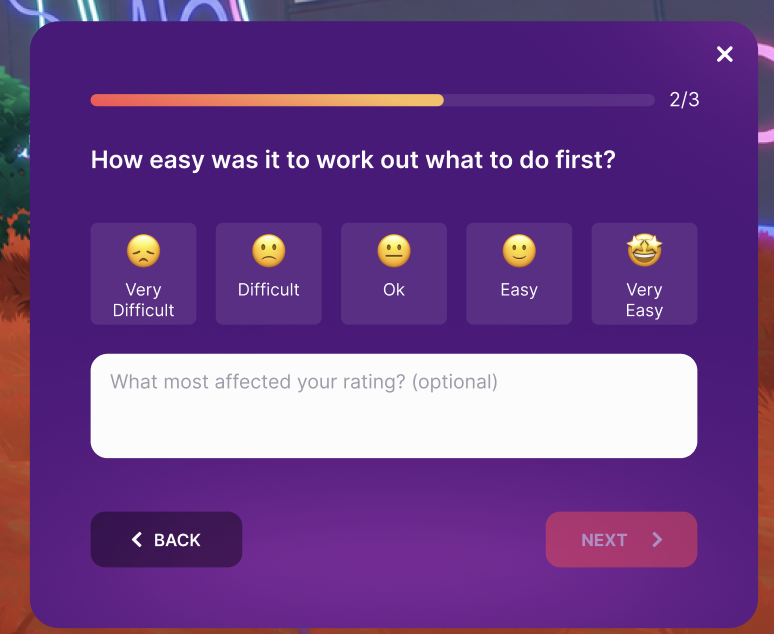
1. **收集第一枚金币。** 系统会邀请玩家提供反馈：“嗨，我们是寻宝团队！”如果玩家接受，接下来会出现一个问题：“你觉得发现这些金币有多容易或多难？”玩家可以选择评分，也可以添加评论。
2. **完成第一轮（五枚金币）。** 同意参与的玩家会依次收到两个问题：下一个目标是否清晰，以及他们是否想继续游玩。
3. **随时提供反馈。** 任何访客都可以使用 **留下反馈** 按钮、可交互的自助终端或标记区域，打开欢迎消息和一组问题；即使之前拒绝了游戏中的提问，也可以这样做。

选择玩家的参与方式：

* **选择参与的玩家：** 通过屏幕提示邀请玩家，或者让他们通过按钮、自助终端或标记区域打开反馈表单。
* **指定测试者：** 使用游戏逻辑，根据钱包地址列表或其他规则选择测试者，然后通过 `feedback.enroll`将其加入。请参阅 [指定测试者示例](https://github.com/decentraland/sdk7-test-scenes/blob/main/scenes/0,-1-scene-feedback/EXAMPLES.md#4-selected-testers-without-an-intro).
* **或者向所有人征求反馈：** 在游玩过程中向访客显示问题，无需事先邀请或提供测试者名单。玩家仍然可以拒绝。请参阅 [参与设置](https://github.com/decentraland/sdk7-test-scenes/blob/main/scenes/0,-1-scene-feedback/README.md#asking-participants-during-play-dynamic-approach).

<figure><img src="https://raw.githubusercontent.com/decentraland/sdk7-test-scenes/main/scenes/0%2C-1-scene-feedback/assets/images/feedback-panel.png" alt="Example feedback form with five rating choices and an optional comment field" width="400"><figcaption><p>一个带有标签评分和可选评论的问题。</p></figcaption></figure>

## 主要功能

* **灵活的问题。** 选择现成的问题和评分量表，根据你的游戏进行调整，或创建自己的问题。可使用带标签的评分、可选评论或纯文本答案。
* **参与奖励。** 使用适合你游戏的奖励鼓励玩家参与。在演示中，玩家在一份表单中回答所有问题后，每次访问可获得仅在本次访问期间显示给你的“游戏测试贡献者”名牌、+5 金币分数，以及接下来五次拾取的双倍分数。任何评分都计入奖励；评论为选填。
* **场景存储中的 CSV 结果。** 多人游戏服务器会保存每条回答，以及对应的问题和游戏时刻。下载这些文件后，可在电子表格中查看。

## 根据你的场景进行调整

使用 [集成方案](https://github.com/decentraland/sdk7-test-scenes/blob/main/scenes/0,-1-scene-feedback/EXAMPLES.md) 将问题与您自己的游戏事件关联起来，包括现在邀请参与者，以及在后续游戏体验后再提问。有关游戏测试的规划和玩家招募，请参阅 [游戏测试](https://docs.decentraland.org/creator/scenes-sdk7/designing-the-experience/playtests).

## AI 生成的反馈报告示例

**该报告由 AI 代理生成，而非由 Scene Feedback 模块生成。** 将导出的 CSV 文件提供给您的代理，并使用 Scene Feedback SDK 技能分析文件并生成 HTML 报告。

此示例使用虚构场景的模拟回答。您的代理可以根据自己的游戏测试问题和数据定制分析和报告。

<figure><img src="https://2460066822-files.gitbook.io/~/files/v0/b/gitbook-x-prod.appspot.com/o/spaces%2FoPnXBby9S6MrsW83Y9qZ%2Fuploads%2Fgit-blob-9b424161af41d71ba3d5280c1f523c0793992083%2Fscene-feedback-example-report.webp?alt=media" alt="Synthetic racing-scene report showing a main finding, response counts and a rating distribution" width="600"><figcaption><p>使用虚构场景模拟回答生成的示例报告。</p></figcaption></figure>

{% file src="/files/1ccf5083a791aec9ae70f9377da5b11b60bae4b2" %}
下载示例报告，解压 ZIP 文件，然后在浏览器中打开 HTML 文件。
{% endfile %}


---

# Agent Instructions
This documentation is published with GitBook. GitBook is the documentation platform designed so that both humans and AI agents can read, navigate, and reason over technical content effectively. Learn more at gitbook.com.

## Querying This Documentation
If you need additional information that is not directly available in this page, you can query the documentation by asking a question.

Perform an HTTP GET request on the following URL with the `ask` and `goal` query parameters:

```
GET https://docs.decentraland.org/creator/content-creator-zh/jiao-cheng-yu-shi-li/scene-management-feedback/playtest-feedback.md?ask=<question>&goal=<user_goal>
```

`ask` is the immediate question: it should be specific, self-contained, and written in natural language.
`goal` is what the user is ultimately trying to achieve, the reason they need the answer. Sharing it helps GitBook give you a better, more relevant answer. A goal is most helpful when it describes the outcome the user wants rather than restating the question. For example, with `ask=how do I create an API token`, a goal like `automate deployments from our CI pipeline` lets GitBook tailor the answer to that use case.

The response will contain a direct answer to the question and relevant excerpts and sources from the documentation.

Use this mechanism when the answer is not explicitly present in the current page, you need clarification or additional context, or you want to retrieve related documentation sections.