> For the complete documentation index, see [llms.txt](https://docs.decentraland.org/llms.txt). Markdown versions of documentation pages are available by appending `.md` to page URLs; this page is available as [Markdown](https://docs.decentraland.org/creator/content-creator-zh/mian-xiang-yi-dong-duan-gou-jian/kai-fa/input-on-mobile.md).
# 移动端输入
在 Decentraland 移动客户端中,输入动作如何映射为触控。
Decentraland 的输入系统旨在与设备无关。相同的 `InputAction` SDK 在桌面端暴露的枚举也会在移动端通过屏幕控制进行路由,因此大多数场景无需任何改动即可运行。不过,在为触控开发时,有一些规则和注意事项值得了解。
完整的输入模型请参见 [点击事件](/creator/content-creator-zh/chang-jing-sdk7/jiao-hu-xing/an-niu-shi-jian/click-events.md)。本页重点介绍移动端特有的内容。
## 移动端应避免用于关键操作的输入
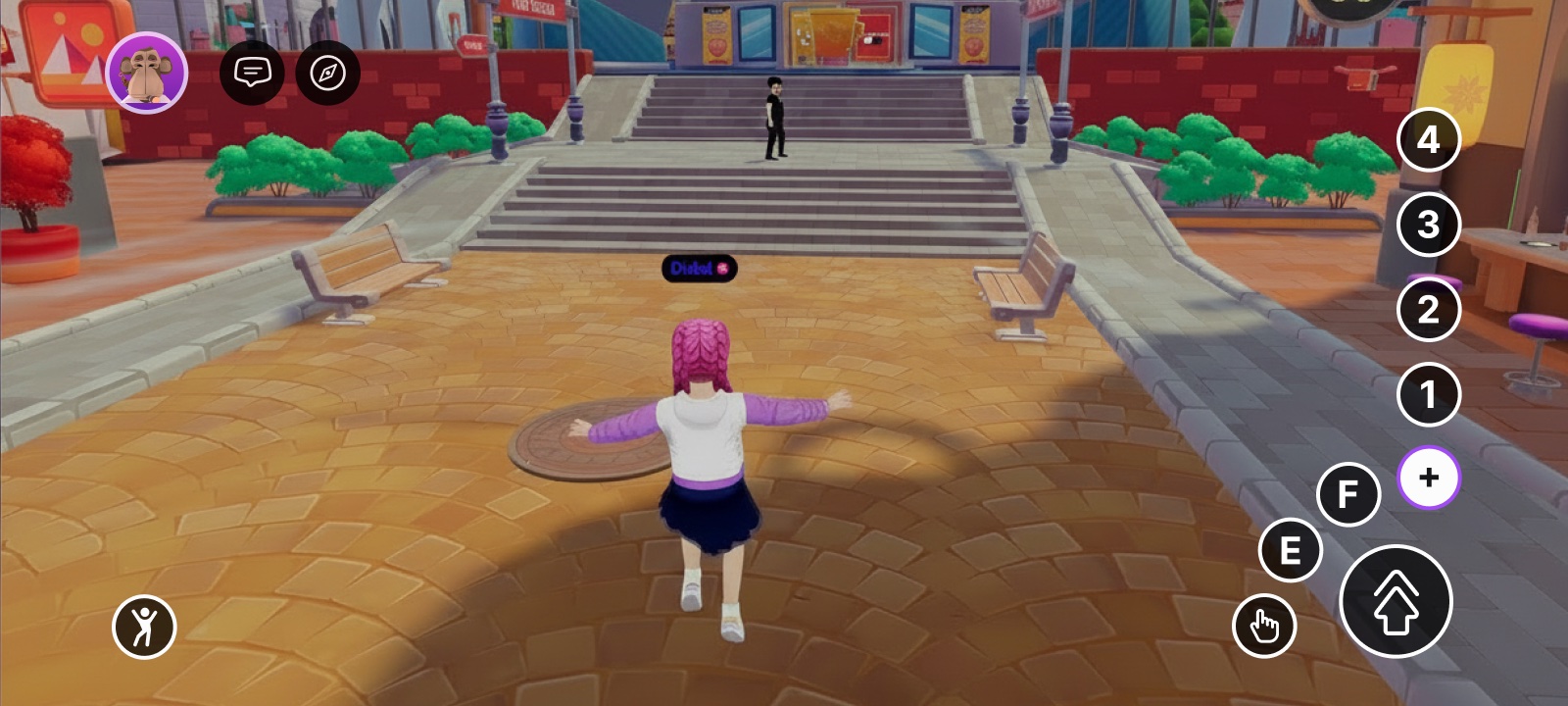
所有 `InputAction` 值在移动端都可到达,但 `IA_ACTION_3`—`IA_ACTION_6` (桌面端的 `1`/`2`/`3`/`4` 按钮)被收纳在二级菜单中,而且 **在游戏过程中不易触及**。如果你的场景将它们用作主要操作,移动端玩家将无法舒适地触发它们。
避免将关键操作绑定到:
* `IA_ACTION_3` — 桌面端的 `1` 键 / `1` 移动端上的按钮
* `IA_ACTION_4` — 桌面端的 `2` 键 / `2` 移动端上的按钮
* `IA_ACTION_5` — 桌面端的 `3` 键 / `3` 移动端上的按钮
* `IA_ACTION_6` — 桌面端的 `4` 键 / `4` 移动端上的按钮
建议改为:
* `IA_POINTER` 用于主要点击 / 交互按钮
* `IA_PRIMARY` 用于 E 按钮操作
* `IA_SECONDARY` 用于 F 按钮操作
* `IA_JUMP` 当某个操作自然对应跳跃时(它是移动端 HUD 上最大且最容易触及的按钮)
* 基于接近触发器(见 [近距离事件](/creator/content-creator-zh/chang-jing-sdk7/jiao-hu-xing/an-niu-shi-jian/proximity-events.md))——当玩家接近某个实体时,该操作应自动触发
## 光标锁定
该 [`PointerLock` 组件](/creator/content-creator-zh/chang-jing-sdk7/jiao-hu-xing/an-niu-shi-jian/click-events.md#lock-or-unlock-the-cursor) 是桌面客户端的概念(锁定与解锁的鼠标光标)。它不适用于移动端触控,因此可以安全地保留在场景中——在那里它不会产生任何影响。
## 相关
* [屏幕控制](/creator/content-creator-zh/chang-jing-sdk7/jiao-hu-xing/touch-screen-controls.md)
* [UI 输入绑定](/creator/content-creator-zh/chang-jing-sdk7/2d-ui/ui_input_binding.md)
* [点击事件](/creator/content-creator-zh/chang-jing-sdk7/jiao-hu-xing/an-niu-shi-jian/click-events.md)
* [近距离事件](/creator/content-creator-zh/chang-jing-sdk7/jiao-hu-xing/an-niu-shi-jian/proximity-events.md)
* [从代码中检测平台](/creator/content-creator-zh/mian-xiang-yi-dong-duan-gou-jian/kai-fa/detect-platform.md)
* [移动端 UI 最佳实践](/creator/content-creator-zh/mian-xiang-yi-dong-duan-gou-jian/kai-fa/ui-best-practices.md)
---
# Agent Instructions
This documentation is published with GitBook. GitBook is the documentation platform designed so that both humans and AI agents can read, navigate, and reason over technical content effectively. Learn more at gitbook.com.
## Querying This Documentation
If you need additional information that is not directly available in this page, you can query the documentation by asking a question.
Perform an HTTP GET request on the following URL with the `ask` and `goal` query parameters:
```
GET https://docs.decentraland.org/creator/content-creator-zh/mian-xiang-yi-dong-duan-gou-jian/kai-fa/input-on-mobile.md?ask=&goal=
```
`ask` is the immediate question: it should be specific, self-contained, and written in natural language.
`goal` is what the user is ultimately trying to achieve, the reason they need the answer. Sharing it helps GitBook give you a better, more relevant answer. A goal is most helpful when it describes the outcome the user wants rather than restating the question. For example, with `ask=how do I create an API token`, a goal like `automate deployments from our CI pipeline` lets GitBook tailor the answer to that use case.
The response will contain a direct answer to the question and relevant excerpts and sources from the documentation.
Use this mechanism when the answer is not explicitly present in the current page, you need clarification or additional context, or you want to retrieve related documentation sections.