> For the complete documentation index, see [llms.txt](https://docs.decentraland.org/llms.txt). Markdown versions of documentation pages are available by appending `.md` to page URLs; this page is available as [Markdown](https://docs.decentraland.org/creator/scenes-sdk7/interactivity/touch-screen-controls.md).

# On-screen Controls

Configure the native on-screen touch controls for your scene.

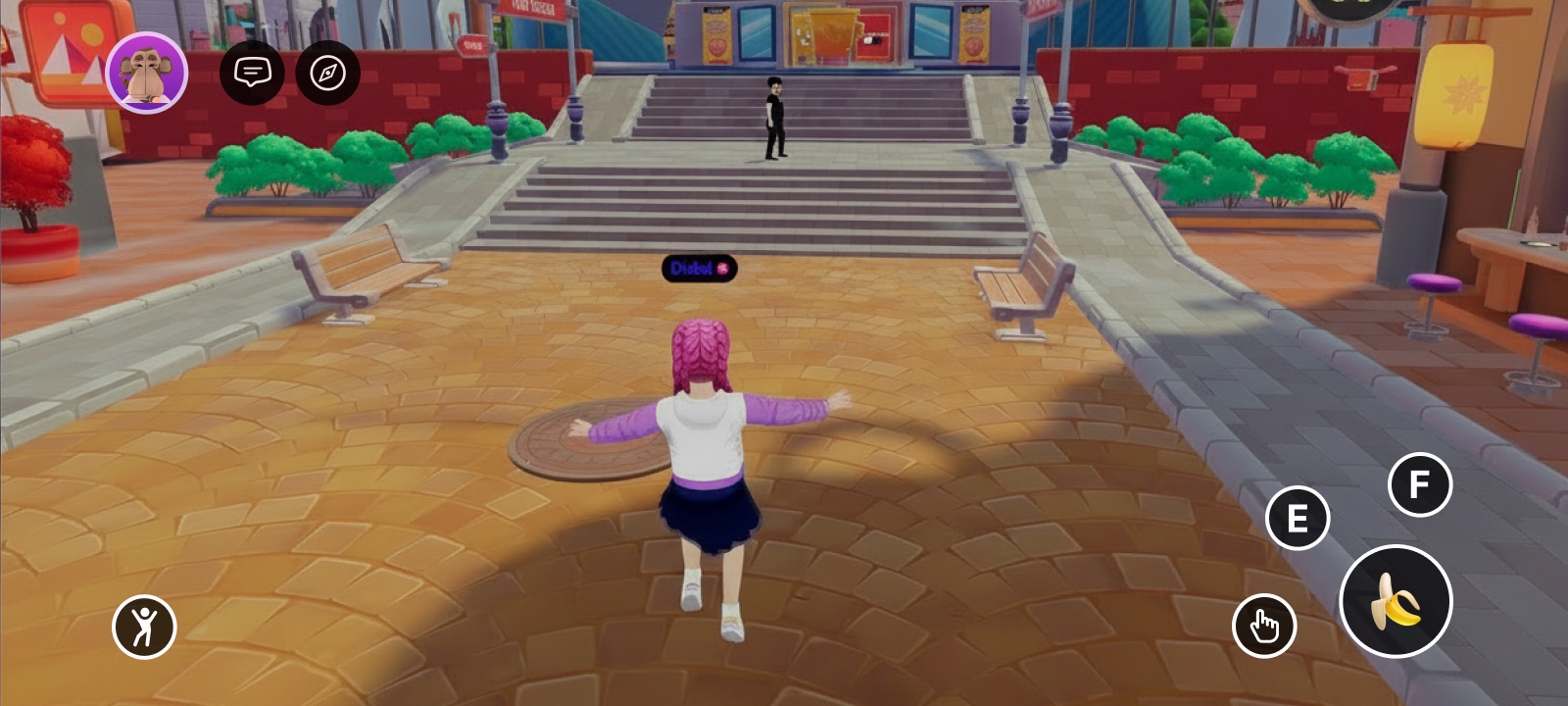
On the mobile client, players interact with your scene through a set of native on-screen controls — a virtual joystick, a crosshair, and a gamepad of buttons. The `TouchScreenControls` component lets your scene reshape that HUD: declutter it, hide the joystick or crosshair, change what the large central button does, swap a button's glyph for your own icon, or hide buttons entirely and replace them with your own UI.

<figure><img src="https://45449780-files.gitbook.io/~/files/v0/b/gitbook-x-prod.appspot.com/o/spaces%2FoPnXBby9S6MrsW83Y9qZ%2Fuploads%2Fgit-blob-0a69ce0ba0199fe829376ff409c7ffa02c679b0a%2Ftouch-controls-default.jpg?alt=media" alt="The default mobile HUD: virtual joystick on the left, gamepad buttons on the right"><figcaption><p>The default on-screen controls, before any customization</p></figcaption></figure>

{% hint style="info" %}
The component is applied automatically while the player is inside your scene and reverts to the defaults (nothing hidden, jump as the central button) the moment they leave — so scenes that don't use it are unaffected. It only affects platforms with native on-screen controls: it's a no-op on desktop and has no effect in VR.
{% endhint %}

## How the button layout works

The gamepad buttons form a single **priority stack**. The order is fixed:

1. `IA_JUMP`
2. `IA_POINTER`
3. `IA_PRIMARY` (E)
4. `IA_SECONDARY` (F)
5. `IA_ACTION_3` (1)
6. `IA_ACTION_4` (2)
7. `IA_ACTION_5` (3)
8. `IA_ACTION_6` (4)

The on-screen positions are fixed too. The **visible** buttons fill those positions from the top of the stack down — so what you change is *which* buttons are visible and *which one leads*, not their order.

| When you…                                      | The controls…                                                                                                                       |
| ---------------------------------------------- | ----------------------------------------------------------------------------------------------------------------------------------- |
| **Hide a button** (any button, including jump) | Every lower-priority button moves up to fill the gap. Hide jump and `IA_POINTER` takes the central spot.                            |
| **Leave the stack alone**                      | The first button (`IA_JUMP`) is the large central button; the next buttons fill the surrounding slots.                              |
| **Set a main button** with `mainAction`        | That action jumps to the front and becomes the central button; every other button keeps its normal order.                           |
| **Set a main button that is also hidden**      | Hiding wins — the button stays hidden.                                                                                              |
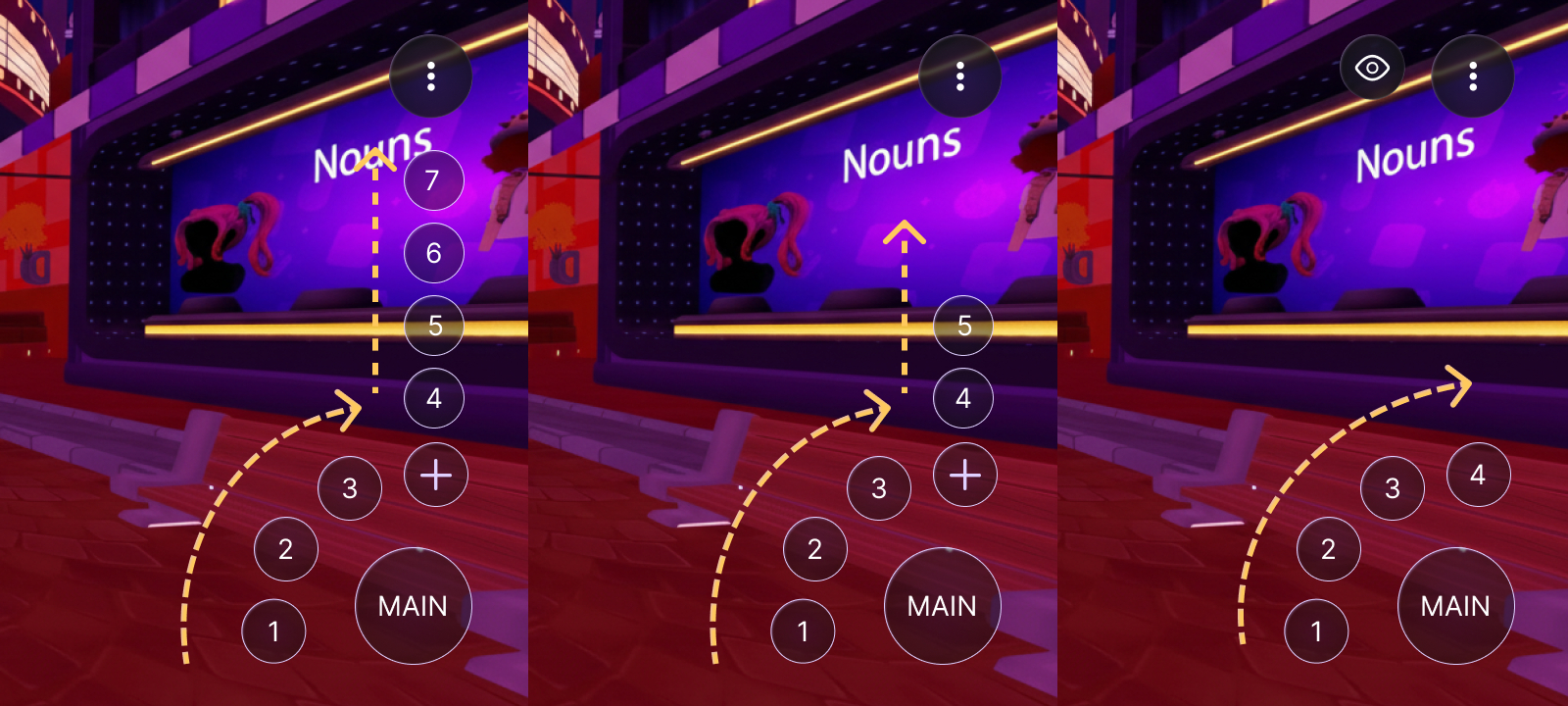
| **Leave 5 or fewer buttons visible**           | All of them show directly (the central button plus up to four around it); there is no "+" menu.                                     |
| **Leave more than 5 buttons visible**          | The "+" takes the last slot, so four show directly (the central button plus three) and the rest sit behind the "+" overflow toggle. |

<figure><img src="https://45449780-files.gitbook.io/~/files/v0/b/gitbook-x-prod.appspot.com/o/spaces%2FoPnXBby9S6MrsW83Y9qZ%2Fuploads%2Fgit-blob-67ed40e222e68d9b13997d0b2fec7e399fc57de0%2Fcontrol-ordering.jpg?alt=media" alt="Three HUDs showing the gamepad reflowing as the number of visible buttons changes"><figcaption><p>How the buttons reflow with the visible count. <strong>Left (7 buttons):</strong> the main button, an arc of 1–3, and the "+" holding the overflow (4–7) in a column that climbs upward. <strong>Center (5 buttons):</strong> the same arc, with a shorter overflow column (4–5) behind the "+". <strong>Right (4 buttons):</strong> all four show directly and the "+" disappears.</p></figcaption></figure>

{% hint style="info" %}
This is also how you surface the `1`/`2`/`3`/`4` buttons, which are otherwise tucked behind the "+": hide enough higher-priority buttons to bring the visible count to five or fewer, and they show directly.
{% endhint %}

## Common tasks

`TouchScreenControls` ships a set of convenience helpers. Each one writes the component onto the scene's `RootEntity` (where the client reads it) and merges with the current value, so you can call them from anywhere.

**Change the main button** — make the large central button trigger a different action:

```ts
import { TouchScreenControls, InputAction } from '@dcl/sdk/ecs'

export function main() {
	TouchScreenControls.setMainAction(InputAction.IA_PRIMARY)
}
```

**Hide the joystick or crosshair** — remove the movement stick and/or the aiming reticle, and bring them back with their `show` counterparts:

```ts
TouchScreenControls.hideJoystick()
TouchScreenControls.hideCrosshair()

// and to bring them back:
TouchScreenControls.showJoystick()
TouchScreenControls.showCrosshair()
```

**Hide specific buttons** — pass the actions you want gone (the rest cascade up):

```ts
TouchScreenControls.hide([InputAction.IA_SECONDARY, InputAction.IA_JUMP])
```

**Hide or show every button** — clear the HUD, or reset it:

```ts
TouchScreenControls.hideAll()
TouchScreenControls.showAll()
```

`showAll()` only affects the gamepad buttons — it doesn't restore a hidden joystick or crosshair. Use `showJoystick()` / `showCrosshair()` for those.

**Replace a button's icon** — for full control (custom icons, several changes at once), write the raw component on `engine.RootEntity`:

```ts
import { engine, TouchScreenControls, InputAction } from '@dcl/sdk/ecs'

export function main() {
	TouchScreenControls.createOrReplace(engine.RootEntity, {
		hideCrosshair: true,
		mainAction: InputAction.IA_PRIMARY,
		touchInputs: [
			{
				inputAction: InputAction.IA_PRIMARY,
				icon: { tex: { $case: 'texture', texture: { src: 'images/grab.png' } } },
			},
		],
	})
}
```

The helpers at a glance:

| Helper                  | What it does                                                                                          |
| ----------------------- | ----------------------------------------------------------------------------------------------------- |
| `setMainAction(action)` | Sets which action the large central button triggers.                                                  |
| `hideJoystick()`        | Hides the native virtual joystick.                                                                    |
| `showJoystick()`        | Shows the native virtual joystick again.                                                              |
| `hideCrosshair()`       | Hides the on-screen crosshair / reticle.                                                              |
| `showCrosshair()`       | Shows the on-screen crosshair / reticle again.                                                        |
| `hide(actions)`         | Hides the given gamepad buttons (merged into the current config).                                     |
| `hideAll()`             | Hides every gamepad button.                                                                           |
| `showAll()`             | Shows every gamepad button (clears the button hide list). Does **not** affect the joystick/crosshair. |

## Properties

Write these directly when you use `createOrReplace`:

| Property        | Type                                                                                              | Description                                                                                                                                                                                                                                                                                          |
| --------------- | ------------------------------------------------------------------------------------------------- | ---------------------------------------------------------------------------------------------------------------------------------------------------------------------------------------------------------------------------------------------------------------------------------------------------- |
| `hideJoystick`  | *boolean*                                                                                         | Hides the native virtual movement joystick.                                                                                                                                                                                                                                                          |
| `hideCrosshair` | *boolean*                                                                                         | Hides the on-screen crosshair / reticle.                                                                                                                                                                                                                                                             |
| `mainAction`    | [*InputAction*](/creator/scenes-sdk7/interactivity/button-events/click-events.md#pointer-buttons) | Moves this action to the front of the stack, making it the large central button; the other buttons keep their order. Only gamepad actions are valid (see below). When unset, the first visible button (`IA_JUMP` by default) leads. See [How the button layout works](#how-the-button-layout-works). |
| `touchInputs`   | *array*                                                                                           | Per-button overrides. A button that isn't listed keeps its default (shown, with its default glyph).                                                                                                                                                                                                  |

Each `touchInputs` entry has:

| Field         | Type                                                                                              | Description                                                                                                                                                                                                                                                                                                                                                                                                                                               |
| ------------- | ------------------------------------------------------------------------------------------------- | --------------------------------------------------------------------------------------------------------------------------------------------------------------------------------------------------------------------------------------------------------------------------------------------------------------------------------------------------------------------------------------------------------------------------------------------------------- |
| `inputAction` | [*InputAction*](/creator/scenes-sdk7/interactivity/button-events/click-events.md#pointer-buttons) | Which on-screen button this entry configures.                                                                                                                                                                                                                                                                                                                                                                                                             |
| `hide`        | *boolean*                                                                                         | Hides this button. Default is `false` (shown). Any button can be hidden, **including `IA_JUMP`** — the rest cascade up to fill its place.                                                                                                                                                                                                                                                                                                                 |
| `icon`        | [*TextureUnion*](/creator/scenes-sdk7/2d-ui/ui_background.md#background) (optional)               | Overrides the button glyph with a scene image. Use the `texture` variant with a content-mapped `src` (an image included in your scene) — `{ tex: { $case: 'texture', texture: { src: 'images/grab.png' } } }`. Only scene-content paths are supported (not external URLs, avatar or video textures). For the jump button this replaces all of its dynamic states (jump / double-jump / glide). If the path can't be resolved, the built-in glyph is used. |

## Which actions map to which buttons

The [`InputAction`](/creator/scenes-sdk7/interactivity/button-events/click-events.md#pointer-buttons) values here are the same ones used across [Input on mobile](/creator/build-for-mobile/develop/input-on-mobile.md) and [Click events](/creator/scenes-sdk7/interactivity/button-events/click-events.md). These are the actions that map to on-screen buttons:

| InputAction                                                   | On-screen button                   |
| ------------------------------------------------------------- | ---------------------------------- |
| `IA_JUMP`                                                     | The large central button (default) |
| `IA_POINTER`                                                  | The interaction button             |
| `IA_PRIMARY`                                                  | The E button                       |
| `IA_SECONDARY`                                                | The F button                       |
| `IA_ACTION_3` / `IA_ACTION_4` / `IA_ACTION_5` / `IA_ACTION_6` | The 1 / 2 / 3 / 4 buttons          |

{% hint style="warning" %}
`IA_ANY` and `IA_MODIFIER` are meta values — they don't map to a button and can't be used here.
{% endhint %}

## Example

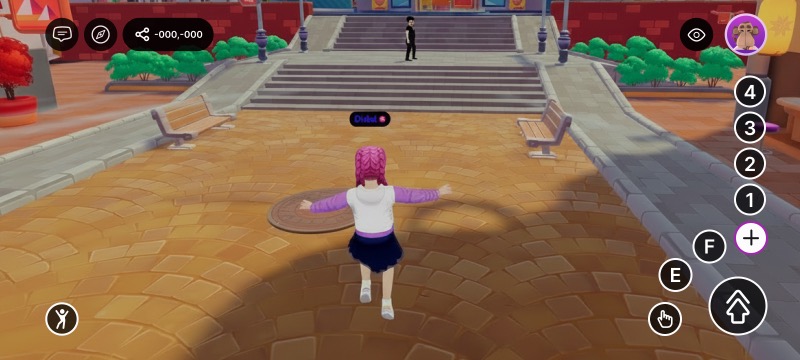
To hide the joystick, tuck away the numbered buttons, and give the central jump button a custom icon shipped in your scene:

```ts
import { engine, TouchScreenControls, InputAction } from '@dcl/sdk/ecs'

export function main() {
	TouchScreenControls.createOrReplace(engine.RootEntity, {
		hideJoystick: true,
		touchInputs: [
			{ inputAction: InputAction.IA_ACTION_3, hide: true },
			{ inputAction: InputAction.IA_ACTION_4, hide: true },
			{ inputAction: InputAction.IA_ACTION_5, hide: true },
			{ inputAction: InputAction.IA_ACTION_6, hide: true },
			{
				inputAction: InputAction.IA_JUMP,
				icon: { tex: { $case: 'texture', texture: { src: 'images/banana.png' } } },
			},
		],
	})
}
```

<figure><img src="https://45449780-files.gitbook.io/~/files/v0/b/gitbook-x-prod.appspot.com/o/spaces%2FoPnXBby9S6MrsW83Y9qZ%2Fuploads%2Fgit-blob-0eef110595612782808b16d7733171deeb560f16%2Fcustom-main-action.jpg?alt=media" alt="A mobile HUD with the joystick hidden and the central jump button showing a custom banana icon"><figcaption><p>The result: joystick gone, numbered buttons hidden (so the "+" disappears), and the jump button re-iconed</p></figcaption></figure>

To replace the native controls entirely, hide them here and build your own touch buttons with [UI Input Binding](/creator/scenes-sdk7/2d-ui/ui_input_binding.md).

## Related

* [UI Input Binding](/creator/scenes-sdk7/2d-ui/ui_input_binding.md)
* [Input on mobile](/creator/build-for-mobile/develop/input-on-mobile.md)
* [Click events](/creator/scenes-sdk7/interactivity/button-events/click-events.md)
* [Detect the platform from code](/creator/build-for-mobile/develop/detect-platform.md)


---

# Agent Instructions
This documentation is published with GitBook. GitBook is the documentation platform designed so that both humans and AI agents can read, navigate, and reason over technical content effectively. Learn more at gitbook.com.

## Querying This Documentation
If you need additional information that is not directly available in this page, you can query the documentation dynamically by asking a question.

Perform an HTTP GET request on the current page URL with the `ask` query parameter, and the optional `goal` query parameter:

```
GET https://docs.decentraland.org/creator/scenes-sdk7/interactivity/touch-screen-controls.md?ask=<question>&goal=<endgoal>
```

`ask` is the immediate question: it should be specific, self-contained, and written in natural language.
`goal` is optional and describes the broader end goal you are ultimately trying to accomplish on behalf of the user. GitBook uses it to tailor the answer towards what is most useful for that goal.

The response will contain a direct answer to the question and relevant excerpts and sources from the documentation.

Use this mechanism when the answer is not explicitly present in the current page, you need clarification or additional context, or you want to retrieve related documentation sections.