> For the complete documentation index, see [llms.txt](https://docs.decentraland.org/llms.txt). Markdown versions of documentation pages are available by appending `.md` to page URLs; this page is available as [Markdown](https://docs.decentraland.org/creator/tutorials-and-examples/scene-management-feedback/playtest-feedback.md).
# Scene Feedback
Collect player ratings and comments during play or through a feedback button, kiosk, or area, with CSV results in scene Storage.
The demo invites players to choose whether to participate.
Learn what players find confusing, frustrating or enjoyable, even when you cannot watch them play. This reusable module includes a coin-hunt scene showing how to collect feedback during play and when players choose to give it.
* [Play shared test build (Zone)](https://decentraland.zone/jump/?dclenv=zone\&realm=sdk7testscenes.dcl.eth\&position=0,-1)
* [Installation and usage guide](https://github.com/decentraland/sdk7-test-scenes/blob/main/scenes/0,-1-scene-feedback/README.md)
## Project information
**Maintained by:** Decentraland
[View source](https://github.com/decentraland/sdk7-test-scenes/tree/main/scenes/0,-1-scene-feedback)
**License:** Not identified in this catalog. Consult the upstream repository and maintainer for applicable terms before reuse.
## Add it with an AI agent
1. Make sure [Decentraland SDK Skills](https://github.com/decentraland/sdk-skills#updating-skills) are installed and up to date.
2. Tell your AI agent: "I want to gather feedback from players in this scene."
The agent can use the Scene Feedback skill to help at two stages:
* **Before a playtest:** adapt questions, rating scales and timing to your game, then integrate the module after you review the plan.
* **After a playtest:** use the skill again with your CSV files to identify recurring problems and preferences, review the evidence and decide what to investigate next. You can also ask for a [human-readable HTML report](#example-ai-generated-feedback-report) with grouped answers and rating summaries.
Prefer to integrate it yourself? Follow the [installation guide](https://github.com/decentraland/sdk7-test-scenes/blob/main/scenes/0,-1-scene-feedback/README.md#add-it-to-your-scene).
## How the module fits into your scene
You choose when to invite players, which questions to ask and when those questions appear in your game. The [coin-hunt demo in Zone](https://decentraland.zone/jump/?dclenv=zone\&realm=sdk7testscenes.dcl.eth\&position=0,-1) shows one possible setup:
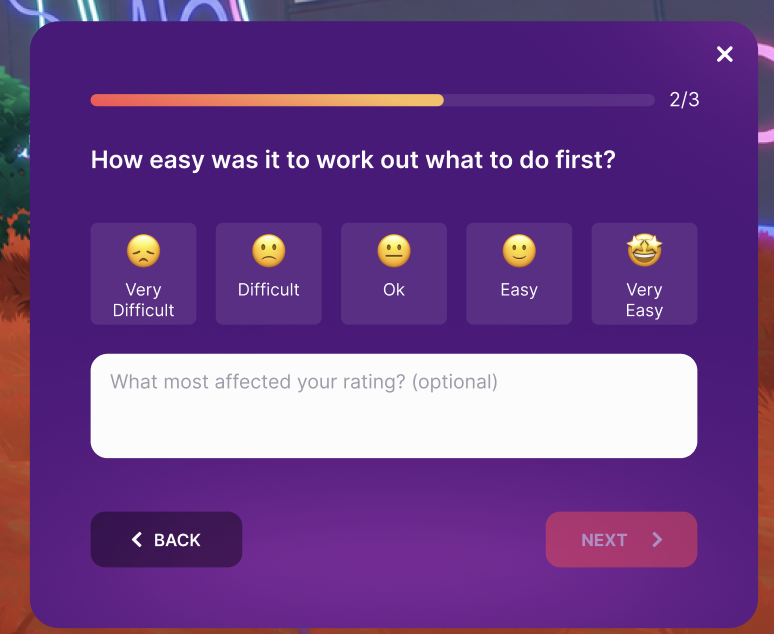
1. **Collect the first coin.** An invitation asks whether the player wants to give feedback: "Hi, we're the Coin Hunt team!" If accepted, one question follows: "How easy or difficult was it to spot the coins?" The player chooses a rating and can add a comment.
2. **Finish the first round (five coins).** Players who agreed to participate receive two questions, one after another: how clear the next goal is and whether they want to keep playing.
3. **Give feedback at any time.** Any visitor can use the **Leave feedback** button, clickable kiosk or marked area to open a welcome message followed by a question set, even after declining gameplay questions.
Choose how players take part:
* **Players who opt in:** invite players with an on-screen prompt, or let them open a feedback form through a button, kiosk or marked area.
* **Selected testers:** use your game logic to choose testers by wallet list or another rule, then enroll them with `feedback.enroll`. See the [selected-tester example](https://github.com/decentraland/sdk7-test-scenes/blob/main/scenes/0,-1-scene-feedback/EXAMPLES.md#4-selected-testers-without-an-intro).
* **Or ask anyone:** show questions to visitors during play without a prior invitation or tester list. Players can still decline. See the [participation settings](https://github.com/decentraland/sdk7-test-scenes/blob/main/scenes/0,-1-scene-feedback/README.md#asking-participants-during-play-dynamic-approach).
A question with a labelled rating and an optional comment.
## Key features
* **Flexible questions.** Choose ready-made questions and rating scales, adapt them to your game or create your own. Use labelled ratings, optional comments or text-only answers.
* **Participation rewards.** Encourage participation with a reward that fits your game. In the demo, answering every question in one form earns a visit-only Playtest Contributor nameplate visible to you, +5 coin score and double score for the next five pickups, once per visit. Any rating counts; comments remain optional.
* **CSV results in scene Storage.** A Multiplayer Server saves each response with its question and gameplay moment. Download the files to review in a spreadsheet.
## Adapt it to your scene
Use the [integration recipes](https://github.com/decentraland/sdk7-test-scenes/blob/main/scenes/0,-1-scene-feedback/EXAMPLES.md) to connect questions to your own game events, including inviting participants now and asking after later gameplay. For playtest planning and finding players, see [Playtests](https://docs.decentraland.org/creator/scenes-sdk7/designing-the-experience/playtests).
## Example AI-generated feedback report
**The report is created by an AI agent, not by the Scene Feedback module.** Give your agent the exported CSV files and use the Scene Feedback SDK skill to analyze them and generate an HTML report.
This example uses synthetic responses from a fictional scene. Your agent can tailor the analysis and report to your own playtest questions and data.
Illustrative report using synthetic responses from a fictional scene.
{% file src="/files/TN6vDwD3jxOVpsxOElEC" %}
Download the example report, extract the ZIP and open the HTML file in your browser.
{% endfile %}
---
# Agent Instructions
This documentation is published with GitBook. GitBook is the documentation platform designed so that both humans and AI agents can read, navigate, and reason over technical content effectively. Learn more at gitbook.com.
## Querying This Documentation
If you need additional information that is not directly available in this page, you can query the documentation by asking a question.
Perform an HTTP GET request on the following URL with the `ask` and `goal` query parameters:
```
GET https://docs.decentraland.org/creator/tutorials-and-examples/scene-management-feedback/playtest-feedback.md?ask=&goal=
```
`ask` is the immediate question: it should be specific, self-contained, and written in natural language.
`goal` is what the user is ultimately trying to achieve, the reason they need the answer. Sharing it helps GitBook give you a better, more relevant answer. A goal is most helpful when it describes the outcome the user wants rather than restating the question. For example, with `ask=how do I create an API token`, a goal like `automate deployments from our CI pipeline` lets GitBook tailor the answer to that use case.
The response will contain a direct answer to the question and relevant excerpts and sources from the documentation.
Use this mechanism when the answer is not explicitly present in the current page, you need clarification or additional context, or you want to retrieve related documentation sections.