> For the complete documentation index, see [llms.txt](https://docs.decentraland.org/llms.txt). Markdown versions of documentation pages are available by appending `.md` to page URLs; this page is available as [Markdown](https://docs.decentraland.org/mobile-app/controls.md).
# Controls
How to move, interact, chat, and use the camera with touch.
The Decentraland mobile app replaces the keyboard and mouse with on-screen touch controls. Everything you can do on desktop is also possible on mobile, with a different layout designed for one-handed touch use.
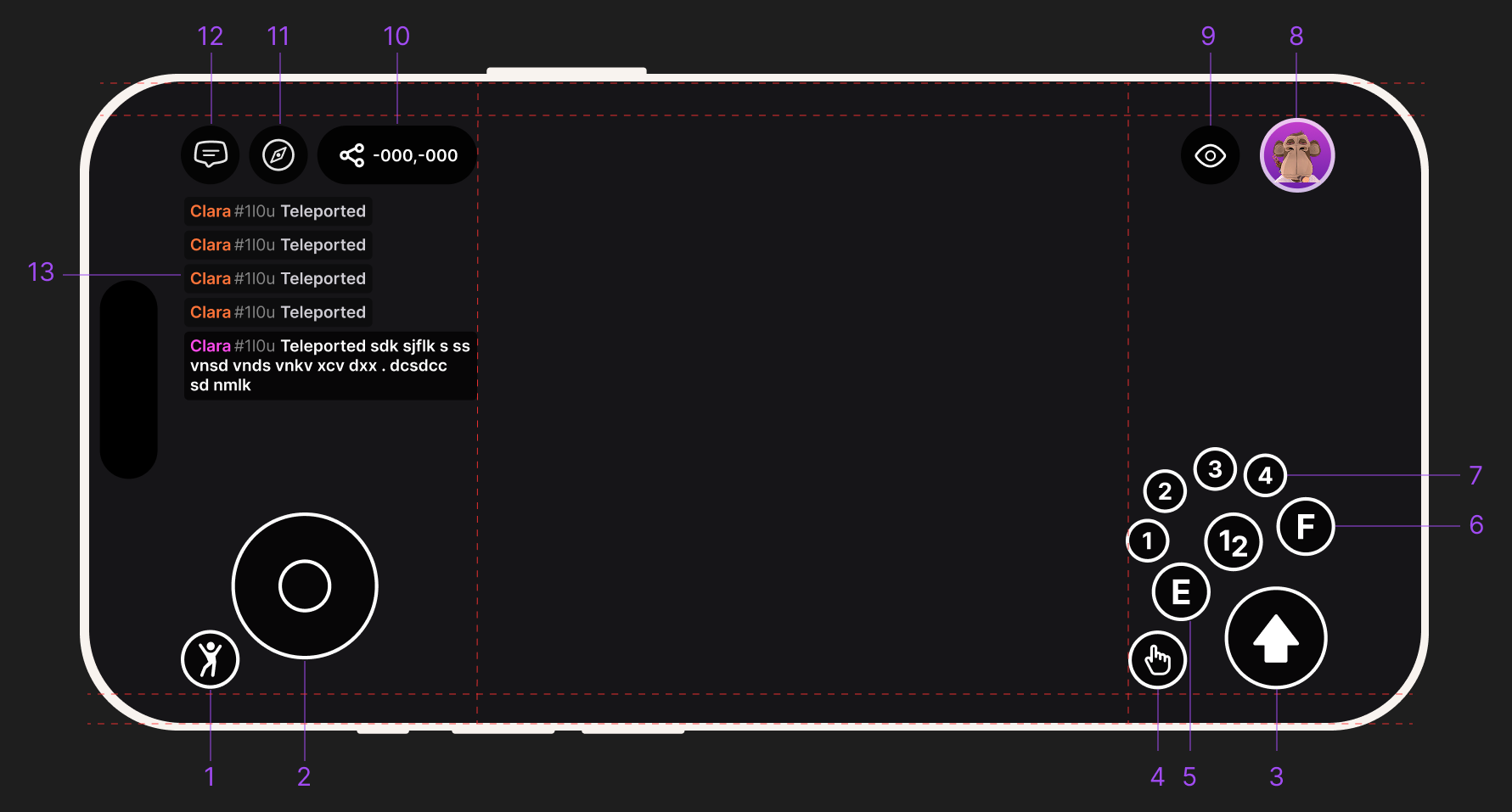
The Decentraland mobile app in-world HUD, with each touch control labeled.
## Movement
* **On-screen joystick** (left side of the screen) — drag to walk and run in any direction. The further you push the joystick, the faster you move.
* **Camera drag** (anywhere on the right side of the screen) — drag to look around. This rotates your view without moving your avatar.
## Interaction
* **Interaction button** (bottom right) — tap to interact with whatever you're aiming at. This is the equivalent of a pointer click on desktop.
* **Tap on objects** — many things in the world can be tapped directly. If a creator has set up an entity to respond to taps, you'll trigger it the same way you would click on desktop.
## Chat
* **Chat icon** (left side) — tap to open chat. Use it to talk to people nearby or to friends in private messages.
## Profile, search, and emotes
* **Profile** (top right) — open your profile, manage your avatar, and access account settings.
* **Search** (left side) — find scenes, worlds, events, and other players.
* **Emotes** (left side) — trigger emotes to express yourself in front of other players.
## Camera
* **Camera controls** (top right) — switch between first-person and third-person views, and access camera-related options.
## Tips
* You can chat with anyone nearby, even if they're on desktop or web. Everyone shares the same world.
* Long-press on the joystick to keep walking without holding the screen with your thumb (depending on app version).
* If a scene's UI ever feels cramped, the creator may not have updated it for mobile yet — give it a moment, look for an alternate view, or report it from the in-app support menu.
## Related
* [Getting started on mobile](/mobile-app/getting-started.md)
* [Troubleshooting](/mobile-app/troubleshooting.md)
* [Shortcuts & Chat Commands](/in-world/shortcuts-and-chat-commands.md) (desktop reference)
---
# Agent Instructions
This documentation is published with GitBook. GitBook is the documentation platform designed so that both humans and AI agents can read, navigate, and reason over technical content effectively. Learn more at gitbook.com.
## Querying This Documentation
If you need additional information that is not directly available in this page, you can query the documentation by asking a question.
Perform an HTTP GET request on the following URL with the `ask` and `goal` query parameters:
```
GET https://docs.decentraland.org/mobile-app/controls.md?ask=&goal=
```
`ask` is the immediate question: it should be specific, self-contained, and written in natural language.
`goal` is what the user is ultimately trying to achieve, the reason they need the answer. Sharing it helps GitBook give you a better, more relevant answer. A goal is most helpful when it describes the outcome the user wants rather than restating the question. For example, with `ask=how do I create an API token`, a goal like `automate deployments from our CI pipeline` lets GitBook tailor the answer to that use case.
The response will contain a direct answer to the question and relevant excerpts and sources from the documentation.
Use this mechanism when the answer is not explicitly present in the current page, you need clarification or additional context, or you want to retrieve related documentation sections.